The ICE scoring model is used to set priorities within work processes. The resulting ICE score helps, for example, when prioritising tasks on to-do lists or creating rankings for planned measures, projects or new ideas. ICE stands for Impact, Confidence and Ease, which correspond to impact, confidence in the impact and ease. The ICE prioritisation method can be used to assess and compare items on to-do lists against these three criteria, then rank them by priority. Measures with a high ICE score move up the ranking and are implemented first because they have a higher priority. The ICE scoring model is also suitable for prioritising projects and/or establishing an order of priority for time management. The ICE score can, for example, be determined through employee surveys.
Table of Contents
Which criteria are included in the ICE score?
When prioritising tasks, the ICE scoring model takes account of the criteria Impact, Confidence and Ease. For example, if several prospective or planned marketing measures are to be prioritised, the employees involved in the work process would be asked for their assessment of each individual measure. In line with the ICE model, an online questionnaire should ask the following three questions about the measures:
- Impact: In your view, how great is the effect of this measure on success?
Alternatively: Will this new measure be effective and, if so, to what extent?
(Scale from 1=very low to 10=very high) - Confidence: How certain are you that this measure will lead to success?
Or: How confident are you that customers will respond positively to this measure?
(Scale from 1=very uncertain to 10=very certain) - Ease: In your opinion, how easy is this measure to implement?
Or: How easy will it be to develop, implement and put this measure into practice?
(Scale from 1=very difficult to 10=very easy)
ICE is an acronym formed from the initial letters of several words. ICE stands for Impact, Confidence and Ease.
In addition to the ICE scoring model, there are other prioritisation methods, such as the PIE score, which takes account of Potential, Importance and Ease. The PIE score can be calculated in the same way as the ICE score.
Calculating the ICE score: two common models
As a rule, all colleagues involved in the project or process are surveyed as part of ICE scoring. Each survey participant can assign a value from 1 to 10 to each planned measure (or project, idea, etc.) for the three criteria Impact, Confidence and Ease. Two different models can be used to calculate the ICE score.
Calculation model 1:
In one of the two common calculations, the numerical values for the three criteria are multiplied. If, for example, a measure receives an average value of Impact=7, Confidence=6 and Ease=8, the ICE score would be 504 (7 x 9 x 8=504). Under this calculation model, the highest possible ICE score is 1000 (10 x 10 x 10) and the lowest is 1 (1 x 1 x 1). In this model, the ICE score therefore ranges from 1 to 1000.
Calculation model 2:
In the second common method of calculating the ICE score, the average of the three criteria is calculated for each measure. In the example above (Impact=7, Confidence=6, Ease=8), the average would be calculated by adding the three values and dividing by the number of values (7 + 9 + 8): 3=8. In this calculation model, the ICE score ranges from 1 to 10; that is, from (1+1+1):3=1 to (10+10+10):3=10. The ICE score based on this calculation model is automatically displayed in your LamaPoll results (see Fig. 1).
Ultimately, it is not important which calculation model is chosen: in both models, the items with the greatest measurable impact move to the top of the priority ranking. In other words, measures that perform best overall across all three categories (effective, promising and easy to implement) are given priority on to-do lists.
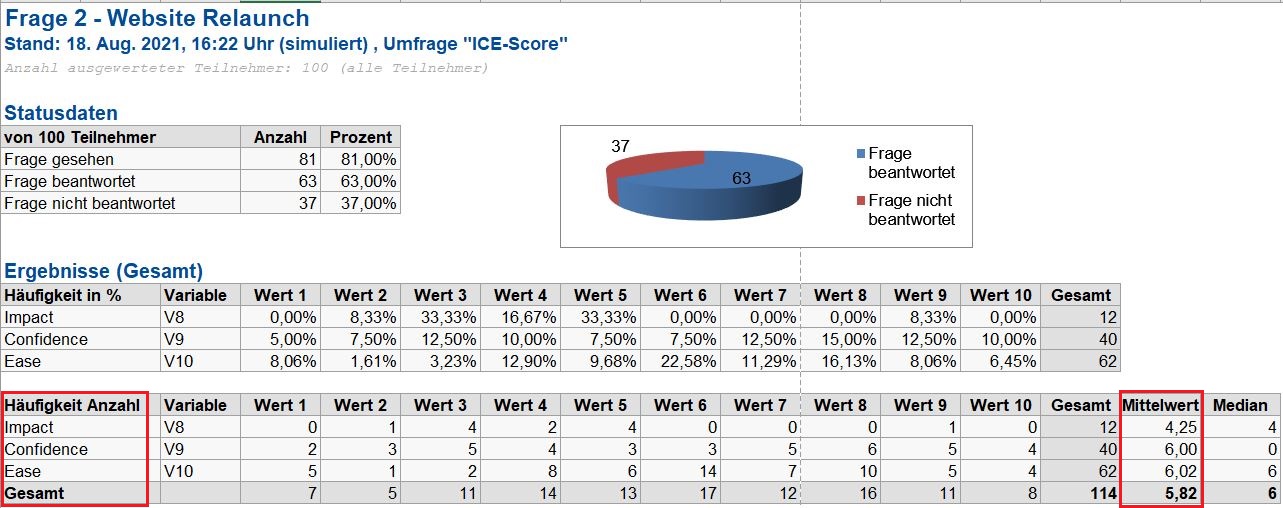
Fig. 1: When you conduct ICE surveys with LamaPoll, the ICE score for each item is automatically displayed in the exported results (calculation model 2).
In our free templates, you will find a questionnaire for determining the ICE score. The example survey prioritises planned marketing measures according to the criteria Impact, Confidence and Ease. The ICE questionnaire template can easily be copied into your LamaPoll account and adapted as required.
Occasions and examples for ICE score surveys
Another example: a new project is to be launched or a new target group addressed, but the approach has not yet been decided. In an internal team brainstorming session, ideas and proposals flow, and the possible to-do list gets longer and longer. Various prioritisation methods can be used to rank these ideas in a purposeful, benefit-oriented way. Alongside the classic Eisenhower principle, which categorises by urgency and importance, and MoSCoW prioritisation, which focuses on importance and impact, the ICE prioritisation method examines and relates three criteria relevant to success. In this way, the ICE model makes it possible to compare ideas and proposals and place them in a meaningful order.
The ICE score can be determined through employee surveys. To this end, colleagues involved are asked in an online questionnaire for their assessment of the proposals, so that project-related measures can then be prioritised on the basis of the ICE score. The ICE method takes account of the different perspectives of everyone involved in the project. This generally identifies the ideas and proposals most likely to be effective, promising and as easy as possible to implement. It can also be used to filter out, discard or assign a lower priority to insignificant, unrealistic and/or difficult-to-implement ideas and proposals.
You are also welcome to use our examples and other free employee survey questionnaire templates, which you can copy into your account and adapt as you wish.
What is LamaPoll?
LamaPoll is a survey tool for creating employee surveys and measuring employee satisfaction. You can use it to create, conduct and analyse all types of employee survey. Create your employee survey in just a few steps, apply your organisation’s corporate design and invite employees conveniently by email or via your intranet. You can quickly gain insights that help improve employee satisfaction. You can register for our survey tool free of charge and immediately conduct surveys for up to 50 employees with no obligation. If you need more responses to your online employee survey questionnaire, simply choose one of our monthly plans. You can also use our employee survey questionnaire templates and examples.